Note
Go to the end to download the full example code
Text anchor
This example shows texts with different anchors, so the text can be aligned in the scene.
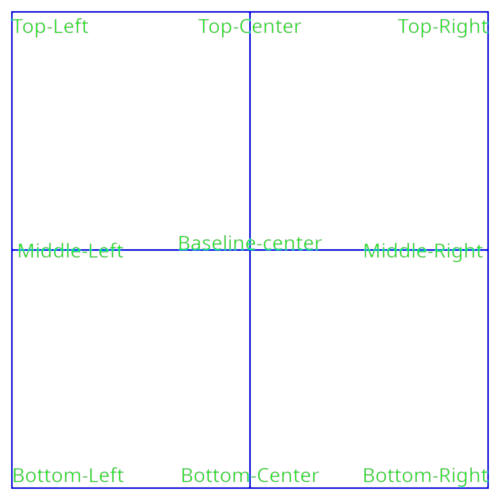
# test_example = true

from wgpu.gui.auto import WgpuCanvas, run
import pygfx as gfx


renderer = gfx.renderers.WgpuRenderer(WgpuCanvas(size=(500, 500)))
scene = gfx.Scene()


def add_text(anchor, pos):
    obj = gfx.Text(
        gfx.TextGeometry(text=anchor, anchor=anchor, font_size=20, screen_space=True),
        gfx.TextMaterial(color="#0f0"),
    )
    obj.local.position = pos
    scene.add(obj)


line_positions = [(0, -1), (0, 1), (-1, 0), (1, 0)]
line_positions += [(-1, -1), (1, -1), (-1, 1), (1, 1)]
line_positions += [(-1, -1), (-1, 1), (1, -1), (1, 1)]
line = gfx.Line(
    gfx.Geometry(positions=[(p[0] * 50, p[1] * 50, -1) for p in line_positions]),
    gfx.LineSegmentMaterial(color="#00f"),
)
scene.add(line)

add_text("Baseline-center", (0, 0, 0))
add_text("Bottom-Left", (-50, -50, 0))
add_text("Bottom-Right", (50, -50, 0))
add_text("Top-Left", (-50, 50, 0))
add_text("Top-Right", (50, 50, 0))
add_text(" Middle-Left", (-50, 0, 0))  # Note the space for extra margin
add_text("Middle-Right ", (50, 0, 0))  # Note the space for extra margin
add_text("Bottom-Center", (0, -50, 0))
add_text("Top-Center", (0, 50, 0))

camera = gfx.OrthographicCamera(105, 105)
renderer.request_draw(lambda: renderer.render(scene, camera))

if __name__ == "__main__":
    print(__doc__)
    run()
Total running time of the script: (0 minutes 0.264 seconds)
