Note
Go to the end to download the full example code
Scene Overlay
Example showing a 3D scene with a 2D overlay.
The idea is to render both scenes, but clear the depth before rendering the overlay, so that it’s always on top.
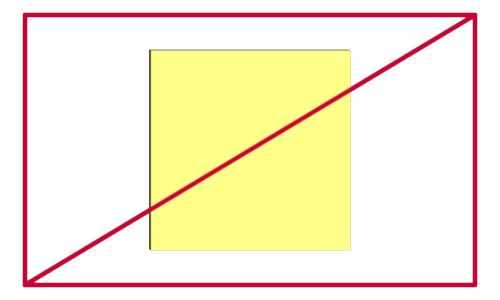
import numpy as np
from wgpu.gui.auto import WgpuCanvas, run
import pygfx as gfx
import pylinalg as la


# Create a canvas and renderer

canvas = WgpuCanvas(size=(500, 300))
renderer = gfx.renderers.WgpuRenderer(canvas)

# Compose a 3D scene

scene1 = gfx.Scene()

geometry1 = gfx.box_geometry(200, 200, 200)
material1 = gfx.MeshPhongMaterial(color=(1, 1, 0, 1.0))
cube1 = gfx.Mesh(geometry1, material1)
scene1.add(cube1)

camera1 = gfx.OrthographicCamera(300, 300)
scene1.add(camera1.add(gfx.DirectionalLight()))

# Compose another scene, a 2D overlay

scene2 = gfx.Scene()

positions = np.array(
    [
        [-1, -1, 0.5],
        [-1, +1, 0.5],
        [+1, +1, 0.5],
        [+1, -1, 0.5],
        [-1, -1, 0.5],
        [+1, +1, 0.5],
    ],
    np.float32,
)
geometry2 = gfx.Geometry(positions=positions * 0.9)
material2 = gfx.LineMaterial(thickness=5.0, color=(0.8, 0.0, 0.2, 1.0))
line2 = gfx.Line(geometry2, material2)
scene2.add(line2)

camera2 = gfx.NDCCamera()


def animate():
    rot = la.quat_from_euler((0.005, 0.01), order="XY")
    cube1.local.rotation = la.quat_mul(rot, cube1.local.rotation)

    renderer.render(scene1, camera1, flush=False)
    renderer.render(scene2, camera2)

    canvas.request_draw()


if __name__ == "__main__":
    canvas.request_draw(animate)
    run()
Total running time of the script: (0 minutes 0.168 seconds)
