Note
Go to the end to download the full example code
Line Drawing
Some basic line drawing.
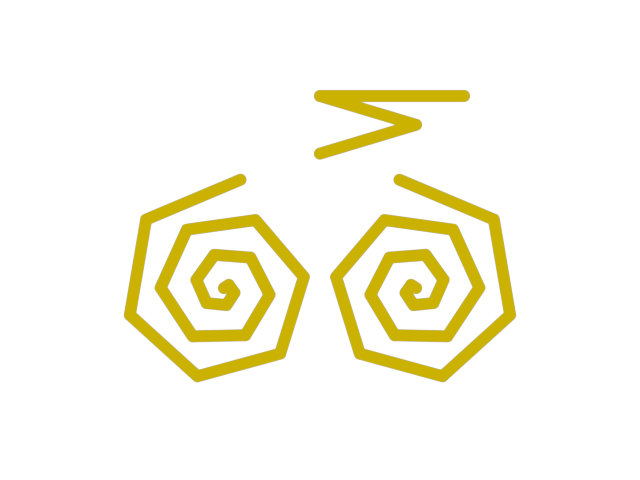
import numpy as np
from wgpu.gui.auto import WgpuCanvas, run
import pygfx as gfx


canvas = WgpuCanvas()
renderer = gfx.WgpuRenderer(canvas)
renderer_svg = gfx.SvgRenderer(640, 480, "~/line.svg")

scene = gfx.Scene()
positions = [[200 + np.sin(i) * i * 6, 200 + np.cos(i) * i * 6, 0] for i in range(20)]
positions += [[np.nan, np.nan, np.nan]]
positions += [[400 - np.sin(i) * i * 6, 200 + np.cos(i) * i * 6, 0] for i in range(20)]
positions += [[np.nan, np.nan, np.nan]]
positions += [
    [450, 400, 0],
    [375, 400, 0],
    [300, 400, 0],
    [400, 370, 0],
    [300, 340, 0],
]

# Spiral away in z (to make the depth buffer less boring)
for i in range(len(positions)):
    positions[i][2] = i

line = gfx.Line(
    gfx.Geometry(positions=positions),
    gfx.LineMaterial(thickness=12.0, color=(0.8, 0.7, 0.0)),
)
scene.add(line)

camera = gfx.OrthographicCamera(600, 500)
camera.local.position = (300, 250, 0)

controller = gfx.PanZoomController(camera, register_events=renderer)


if __name__ == "__main__":
    renderer_svg.render(scene, camera)
    canvas.request_draw(lambda: renderer.render(scene, camera))
    run()
Total running time of the script: (0 minutes 0.214 seconds)
