Note
Go to the end to download the full example code.
Text direction
Pygfx text supports multiple text directions. Latin scripts (like English) are left-to-right. A right-to-left direction is used for e.g. Arabic, and top-to-bottom sometimes for Asian languages.
By default pygfx auto-selects a direction based on the script, choosing either between ltr or rtl (Asian languages go ltr).
In this example the same piece of (English) text is shown with different directions, and the bounding box for each text is also shown. A correct bounding box is a pretty good indicator that all anchor variants work (testing all anchors for all directions would be a lot).
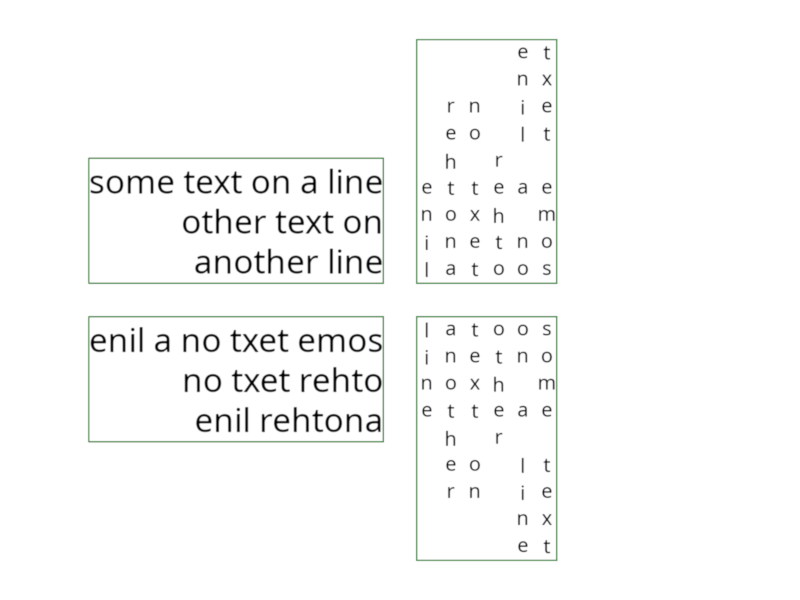
from wgpu.gui.auto import WgpuCanvas, run
import pygfx as gfx

scene = gfx.Scene()


scene.add(gfx.Background.from_color("#fff"))
text = """
some text on a line
other text on another line
""".strip()


material = gfx.TextMaterial(color="#000")


text1 = gfx.Text(
    text=text,
    direction="ltr",
    font_size=1,
    max_width=10,
    text_align="right",
    anchor="bottom-right",
    anchor_offset=0.5,
    material=material,
)

text2 = gfx.Text(
    text=text,
    direction="rtl",
    font_size=1,
    max_width=10,
    text_align="right",
    anchor="top-right",
    anchor_offset=0.5,
    material=material,
)

text3 = gfx.Text(
    text=text,
    direction="btt",
    font_size=0.6,
    max_width=8,
    anchor="bottom-left",
    anchor_offset=0.5,
    material=material,
)

text4 = gfx.Text(
    text=text,
    direction="ttb",
    font_size=0.6,
    max_width=8,
    anchor="top-left",
    anchor_offset=0.5,
    material=material,
)


scene.add(text1, text2, text3, text4)


for text in (text1, text2, text3, text4):
    bh = gfx.BoxHelper(color="green")
    bh.set_transform_by_object(text)
    text.add(bh)

camera = gfx.OrthographicCamera(24, 18)

renderer = gfx.renderers.WgpuRenderer(WgpuCanvas(size=(800, 600)))

renderer.request_draw(lambda: renderer.render(scene, camera))

if __name__ == "__main__":
    run()
Total running time of the script: (0 minutes 0.261 seconds)